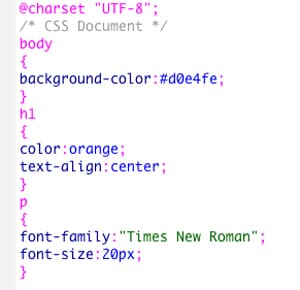
CSS Style Example
CSS allows developers to control the amount of space between elements such as paragraphs, images, buttons, and sections.
A beginner-friendly website explaining the basics of HTML, CSS, and web design.
CSS (Cascading Style Sheets) is a language used to control the appearance and design of a website. While HTML provides the structure and content of a webpage, CSS is responsible for making the webpage visually appealing and organized. CSS allows developers to change colors, fonts, spacing, layouts, borders, backgrounds, and many other design elements. Without CSS, websites would appear plain and difficult to read because everything would display in a simple default style. By using CSS, developers can create websites that are attractive, professional, and easier for users to navigate.
One of the most important features of CSS is the ability to change colors on a webpage. Developers can customize the color of text, backgrounds, buttons, borders, and links to match a specific theme or design. For example, a business website may use professional colors such as blue or gray, while a gaming website may use brighter and more vibrant colors. CSS makes it possible to create a unique visual identity for a website and improve the overall user experience. Colors can also help organize information by drawing attention to important sections or buttons. CSS is also used to control fonts and text styles. Developers can change the size, style, weight, and alignment of text to make content easier to read and more visually appealing. For example, headings can be made larger and bolder than regular paragraphs to separate sections of information. Different font styles can create different moods or themes for a website, such as formal, modern, creative, or playful. Proper text styling helps websites appear more organized and professional.
CSS allows developers to control the amount of space between elements such as paragraphs, images, buttons, and sections.